A dash cam voltmeter test is a quick way to check if your camera is getting stable power in the right driving and parking conditions. It helps you spot power-related install problems early, especially issues that show up during startup, recording load, or parking mode.
Key Takeaways:
A dash cam can look fine, then fail when you need it most. A simple dash cam voltmeter test helps catch weak power, hardwiring mistakes, and parking mode issues early. If something feels off, a voltmeter is a smart first check before you start guessing.
A dash cam voltmeter test will not identify every fault, but it quickly shows if your camera is getting stable power. Since many dash cam issues are actually power-related, this simple check helps explain restarts, failures, and parking mode problems.
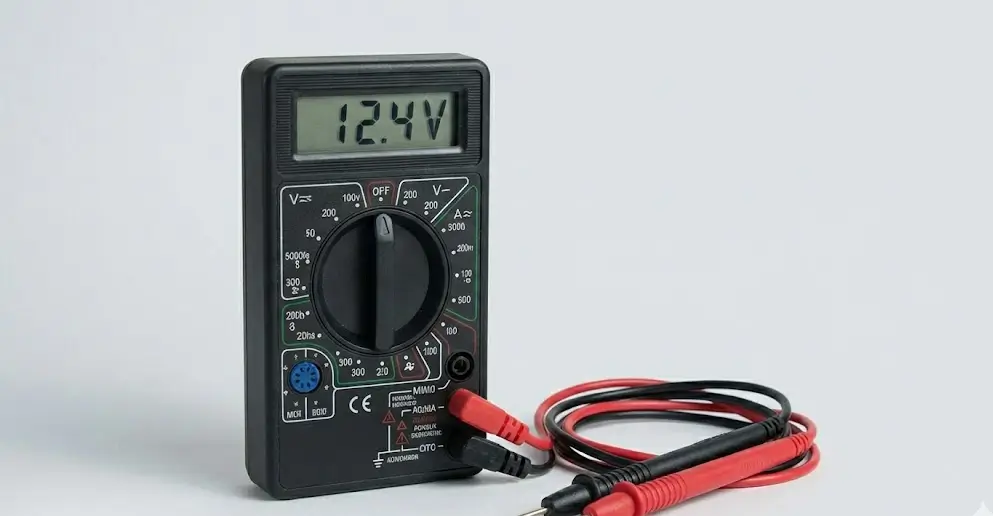
If your dash cam restarts at startup or stops working overnight, power is often the issue. Rear camera dropouts can also come from unstable voltage, not just bad cables. A voltmeter helps you quickly narrow down whether it is power or wiring.
A voltmeter cannot check signal quality, SD card health, or internal camera faults on its own. It is still a smart first step, which is why experienced installers test power first before replacing parts or chasing harder-to-find issues.
For a basic dash cam voltmeter test, use a digital voltmeter on DC voltage, good lighting, and identify your dash cam wires first. Work carefully, avoid random circuits, and if you are unsure about a fuse or wire, check the guide.
Do not probe airbag wiring, steering column looms, or anything you are unsure about. Control your tools and avoid slipping across terminals, because shorts happen fast. When testing near the fuse box, go slowly and keep your hands steady.
A digital voltmeter, your dash cam hardwire kit diagram if you have it, and access to the fuse box or power point used by the install are enough for a basic check. If your setup uses an external battery pack, keep that product information handy too so you know what readings and behaviour to expect.
The goal of a basic dash cam voltmeter test is simple, and it is to confirm that your dash cam receives the right power when the car is off, when ACC is on, and when the engine is running. You are checking for consistency, not chasing one perfect number.
Start by checking battery voltage with the engine off and the car settled for a few minutes, so you have a proper baseline before blaming the dash cam.
If your dash cam is hardwired, test the constant power feed with the ignition off. This feed should stay live so the camera can enter and stay in parking mode properly. If voltage disappears, the camera may not switch modes correctly, and the fuse tap may be connected to the wrong circuit.
Check the ACC or ignition-switched feed with the car off, then again with ACC on. It should be off when the vehicle is off and live when ACC is on. If timing is wrong, the hardwire kit may misread modes, causing parking mode issues and battery drain.
A circuit can look fine with no load, then act up once recording starts, especially on two or three channel systems. During a dash cam voltmeter test, check voltage while the camera records. If it drops under load, the circuit or connection may be weak.
Watch voltage during engine crank, because startup is where hidden install issues often show up.
If summer heat is making your dash cam less reliable, read why battery dash cams fail in Aussie heat and why capacitors keep recording for a practical breakdown of heat-related power stability issues.
After driving, switch the car off and check if the dash cam enters parking mode. Use your voltmeter to confirm constant power stays stable while ACC drops. If it shuts down instead, check wiring logic, cutoff settings, or battery condition before changing anything else.
A dash cam voltmeter test done only with the camera off can miss real problems. Test under load, during startup, and after shutdown. Also check your ground contact carefully, because poor probe contact can cause misleading readings and bad diagnosis.
DNH Dashcam Solutions takes a practical approach to installs, with a focus on reliable performance in real driving and parking conditions, not just neat cable hiding. Their advice and installation work both reflect a test-first mindset that helps prevent common power and setup issues.
As a Melbourne-based mobile service, they install at your home or workplace and tailor the setup to your vehicle, budget, and driving needs, including multi-channel systems and battery pack options. They also back up clean hardwiring with proper checks and local support, so you are not left guessing after the install is done.
If you have never run a dash cam voltmeter test, start with the basics and focus on battery baseline, ACC feed, constant feed, and behaviour under load. That simple routine can catch the most common installed health problems before they cost you footage.